
A Practical Guide to Low-Latency Conversational Experiences
Introduction
Voice is quickly becoming the most natural interface for interacting with AI. But building a real-time, responsive, and scalable voice assistant is not trivial — it requires low-latency media streaming, intelligent processing, and seamless orchestration between systems.
This is where the combination of Agora’s Real-Time Communication (RTC) platform and OpenAI’s language models shines.
In this blog, we’ll walk through:
- The architecture behind a real-time voice AI system
- How Agora and OpenAI work together
- A quick start approach using Python
- Key implementation concepts like the
RealtimeKitAgent
Architecture Overview
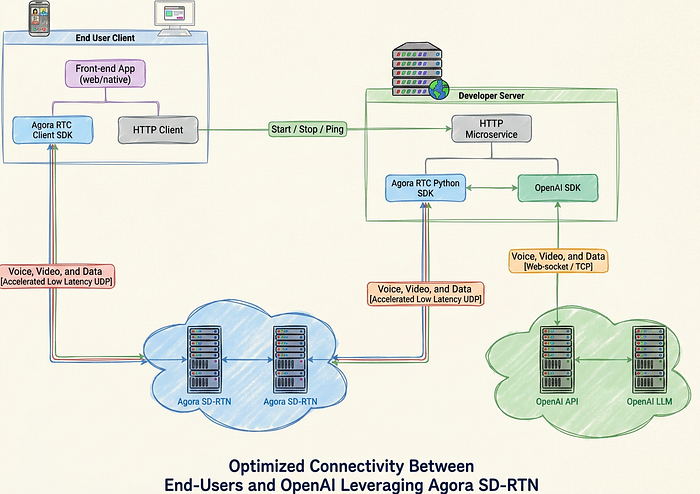
The system is designed to optimize communication between end users and AI using Agora’s Software-Defined Real-Time Network (SDRTN®).
Key Components
1. End-User Client
- A web or native frontend application
- Uses:
Agora RTC Client SDK → captures and streams audio/video
HTTP Client → communicates with backend services
The client streams voice, video, and data over UDP, ensuring ultra-low latency.
2. Developer Server
- Hosts an HTTP microservice
- Integrates:
Agora RTC Python SDK
OpenAI SDK
This layer acts as the brain of the system, coordinating real-time communication and AI processing.
3. Agora SDRTN®
- Global, distributed network for real-time media
- Handles:
Audio streaming
Network optimisation
Low-latency delivery
4. OpenAI API + LLM
- Processes incoming audio
- Generates:
Transcriptions
AI responses
Synthesised voice
How It Works
At the heart of this integration is the RealtimeKitAgent.
Step-by-Step Flow
- User speaks into the app
- Audio is streamed via Agora RTC → SDRTN®
- Server receives audio using Agora Python SDK
- Audio frames are sent to OpenAI API
- OpenAI processes input:
- Speech → text (transcription)
- Text → response (LLM)
- Response → audio (TTS)
- The response is streamed back:
- OpenAI → Server → Agora → User
The result: a live, conversational AI experience
The Role of RealtimeKitAgent
The RealtimeKitAgent orchestrates the entire pipeline.
Responsibilities
- Connects to an Agora channel
- Streams audio to OpenAI in real time
- Receives and processes OpenAI responses
- Sends audio responses back to users
Message Handling
It manages multiple message types:
- Audio Input Frames
- Transcription Updates
- Synthesized Audio Responses
- Error Messages
The agent can:
- Call local functions
- Trigger external APIs
- Fetch real-time data
Example Use Cases
- Weather lookup
- Database queries
- IoT control
- Customer support workflows
This transforms your assistant from a chatbot into an actionable AI agent.
Why This Architecture Works
Ultra-Low Latency
Agora SDRTN® ensures real-time delivery using UDP-based transport.
Intelligent Responses
OpenAI models provide natural, context-aware conversations.
Real-Time Feedback Loop
Continuous streaming allows interruptions, back-and-forth dialogue, and fluid interaction.
Scalable by Design
Microservices + cloud APIs make it production-ready.
Use Cases
This integration unlocks a wide range of applications:
- Voice assistants
- AI-powered call centers
- Real-time translation tools
- Interactive gaming NPCs
- Telehealth assistants
- Conversational commerce
Quickstart Guide (Python)
To get started:
- Set up a Python backend
- Install:
- Agora RTC Python SDK
- OpenAI SDK
- Configure:
- Agora credentials
- OpenAI API key
- Implement
RealtimeKitAgent - Connect your frontend client
Final Thoughts
By combining Agora’s real-time streaming capabilities with OpenAI’s powerful AI models, developers can build next-generation voice applications that feel natural, responsive, and intelligent.
This architecture removes traditional bottlenecks in voice systems and enables true real-time AI conversations.
Get Started
For full implementation details, code examples, and setup instructions, check our official documentation:
👉 https://docs.agora.io/en/open-ai-integration/get-started/quickstart#test-the-code


