

문제: 전자상거래는 여전히 외로운 경험이다
온라인 쇼핑에는 오프라인 매장에서의 경험을 특별하게 만드는 ‘사람의 손길’이 부족합니다. 오프라인 매장에 들어서면 전문 지식을 갖춘 판매원이 즉시 질문에 답해 주고, 다른 고객들의 의견을 전해 주며, 해당 제품이 정말로 내 필요에 맞는지 파악할 수 있도록 도와줍니다. 하지만 온라인에서는? 모든 것을 혼자서 해결해야 합니다. 이해하기 어려운 제품 사양을 훑어보고, 내 구체적인 우려 사항을 다룬 단 한 건의 리뷰를 찾아 헤매며, 결국 올바른 선택을 하고 있는지 추측만 하게 됩니다.
이러한 격차는 소매업체에 실질적인 손실을 초래합니다. 연구 결과에 따르면, 고객들은 즉각적인 답변을 얻지 못하면 구매를 포기하는 것으로 나타났습니다. 이들은 “더 알아보기 위해” 사이트를 떠나고 다시는 돌아오지 않습니다. 구매를 완료한 고객들조차 기능에 대해 오해했거나 잘못된 제품을 선택했다는 이유로 반품을 하는 경우가 많습니다.
챗봇이 이 문제를 해결해 줄 것으로 기대되었지만, 실제로는 그렇지 않았습니다. 대부분의 전자상거래 챗봇은 기계적으로 느껴지고, 미리 정해진 시나리오만 처리할 수 있을 뿐이며, 고객에게 도움이 되기보다는 오히려 불만을 야기합니다. 누군가 챗봇의 제한된 학습 범위를 조금이라도 벗어난 질문을 하는 순간 — “손이 작은 사람도 이 제품을 잘 사용할 수 있나요?” 또는 “야외에서 이 제품을 사용하는 것에 대해 사람들이 어떻게 말하나요?” — 사용자 경험은 완전히 무너져 버립니다.
음성 AI는 이러한 상황을 완전히 바꿔놓습니다. 고객은 검색어를 입력하거나 긴 텍스트를 일일이 분석할 필요 없이, 마치 실제 사람과 대화하듯이 간단히 질문을 던지고 답변을 들을 수 있습니다. 이 AI는 제품 정보, 고객 리뷰, 사양 등을 종합하여 자연스러운 답변을 생성합니다. 또한 문맥을 파악하고 후속 질문에도 대응할 수 있습니다. 마치 고려 중인 제품에 대해 모든 것을 꿰뚫고 있는 지식이 풍부한 친구가 곁에 있는 듯한 느낌을 줍니다.
하지만 실시간 음성 AI를 구축하는 것은 정말 어려운 일입니다. 낮은 지연 시간이 필요합니다(이상적으로는 1초 미만이어야 하며, 1초 이상의 눈에 띄는 지연은 대화의 흐름을 방해합니다). 또한 대화 도중의 끼어듦을 자연스럽게 처리해야 합니다(고객은 AI가 말을 끝낼 때까지 기다리지 않고 바로 다음 질문을 던지기 때문입니다). 다양한 억양, 배경 소음, 일상적인 말투에도 잘 작동하는 음성 인식 기능이 필요합니다. 대본을 읽는 로봇처럼 들리지 않는 텍스트 음성 변환(TTS) 기능도 필요합니다. 또한, 특정 제품 데이터에 대해 추론할 수 있는 대규모 언어 모델(LLM)을 통해 이 모든 요소를 조화롭게 통합해야 합니다.
이 가이드에서는 Agora의 대화형 AI 플랫폼을 활용해 실제 서비스에 바로 적용할 수 있는 음성 쇼핑 어시스턴트를 구축하는 방법을 안내합니다. 이 플랫폼은 까다로운 인프라 문제를 처리해 주므로, 여러분은 고객 경험에 집중할 수 있습니다.
우리가 만들고 있는 것
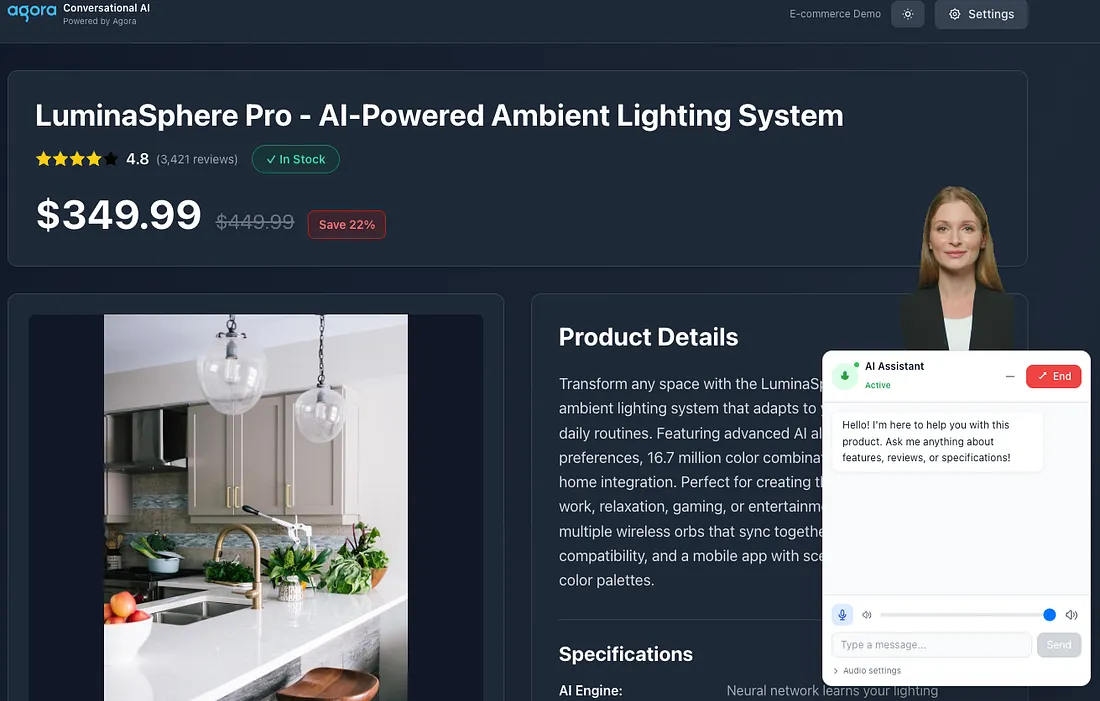
음성 인식 기능을 갖춘 쇼핑 도우미로, 다음과 같은 기능을 제공합니다:
- 고객과 자연스럽게 대화합니다 — 대본에 따른 답변이 아닌, 진정한 대화형 AI
- 귀사의 제품을 깊이 이해하고 있습니다 — 실제 제품 데이터, 사양 및 고객 리뷰를 바탕으로 질문에 답변합니다
- 대화 내용 표시 — 실시간 텍스트 변환 기능을 통해 고객이 대화 내용을 따라가며 확인하거나 참조할 수 있습니다
- 사람처럼 보임 (선택 사항) — 시각적 몰입감을 높이기 위해 실물 같은 AI 아바타를 생성합니다
그 결과, 실제 리뷰를 종합해 “고객들은 배터리 수명에 대해 어떻게 말하나요?”와 같은 질문에 답하거나, 기술 사양을 쉬운 말로 설명해 주거나, 고객이 여러 옵션을 비교할 수 있도록 도와주는 AI가 탄생했으며, 이 모든 것이 자연스러운 음성 대화를 통해 이루어집니다.
아키텍처 개요
이 시스템은 다음 네 가지 핵심 요소를 연결합니다:
┌─────────────────┐     ┌──────────────────┐     ┌─────────────────────┐
│   Browser       │────▶│   Next.js API    │────▶│  Agora Services     │
│   (React)       │◀────│   Routes         │◀────│  - RTC (Audio)      │
│                 │     │                  │     │  - RTM (Messaging)  │
│  - useAgora     │     │  - /initialize   │     │  - ConvoAI Agent    │
│  - ChatInterface│     │  - /start-agent  │     │                     │
│  - ConvoAI API  │     │  - /leave-agent  │     │  External:          │
│                 │     │                  │     │  - LLM (OpenAI)     │
└─────────────────┘     └──────────────────┘     │  - TTS (Azure)      │
                                                 │  - Avatar (HeyGen)  │
                                                 └─────────────────────┘
왜 이런 아키텍처를 선택했나요?
- API 라우트가 인증 정보를 처리합니다 — Agora API 키는 브라우저에 절대 노출되지 않습니다. Next.js 서버가 토큰을 생성하고 에이전트를 안전하게 시작합니다.
- RTC는 실시간 미디어를 전송합니다. — Agora RTC는 사용자와 AI 에이전트 간의 양방향 오디오 스트림을 처리합니다. 여기서 중요한 것은 낮은 지연 시간입니다. 질문을 한 후 2초나 기다려야 한다면 누구도 원치 않을 것입니다.
- RTM은 대화록을 제공합니다 — 실시간 메시징 계층(RTM)은 대화록을 즉시 전달합니다. 이를 통해 채팅 UI에서 양측이 나눈 대화를 확인할 수 있습니다.
- ConvoAI가 모든 것을 통합 관리합니다. 아고라의 대화형 AI 서비스는 GPT-4와 같은 대규모 언어 모델(LLM), 텍스트 음성 변환(TTS) 기능, 그리고 선택 사항인 아바타를 하나의 유기적인 챗봇으로 연결해 줍니다.
프로젝트 구조
├── app/
│   ├── api/agora/
│   │   ├── initialize/route.ts    # Creates channel + tokens
│   │   ├── start-agent/route.ts   # Starts ConvoAI agent with product context
│   │   └── leave-agent/route.ts   # Cleanup when user exits
│   └── page.tsx                   # Entry point
├── components/
│   ├── ChatInterface.tsx          # Main voice chat UI
│   ├── AIAssistant.tsx           # Floating chat button
│   └── ProductPage.tsx           # E-commerce product display
├── hooks/
│   └── useAgora.ts               # RTC connection management
├── lib/
│   ├── conversational-ai-api/    # ConvoAI toolkit for transcripts
│   │   ├── index.ts              # Main API class
│   │   └── type.ts               # TypeScript definitions
│   └── product.ts                # Product data (mock database)
1단계: 아고라 세션 초기화
사용자가 AI 어시스턴트 버튼을 클릭하면, 먼저 채널과 토큰이 필요합니다. /api/agora/initialize 엔드포인트가 이를 처리합니다:
// app/api/agora/initialize/route.tsimport { NextRequest, NextResponse } from "next/server";
import pkg from "agora-token";
const { RtcTokenBuilder, RtcRole } = pkg;
export async function POST(request: NextRequest) {
  const body = await request.json();
  const { userId, credentials } = body;
  // Generate a unique channel name
  const uid = userId ? parseInt(userId) : Math.floor(Math.random() * 100000);
  const channel = `channel_${Date.now()}_${Math.random().toString(36).substring(7)}`;
  const APP_ID = credentials?.agora?.appId || process.env.AGORA_APP_ID;
  const APP_CERTIFICATE =
    credentials?.agora?.appCertificate || process.env.AGORA_APP_CERTIFICATE;
  // Token expires in 1 hour
  const expirationTimeInSeconds = 3600;
  const currentTimestamp = Math.floor(Date.now() / 1000);
  const privilegeExpiredTs = currentTimestamp + expirationTimeInSeconds;
  // Generate a combined RTC + RTM token using buildTokenWithRtm2
  // This token grants RTC privileges and RTM 2.x messaging privileges for the same channel and user aging
  const token = RtcTokenBuilder.buildTokenWithRtm2(
    APP_ID,
    APP_CERTIFICATE,
    channel,
    uid, // RTC UID (numeric)
    RtcRole.PUBLISHER,
    privilegeExpiredTs, // Token expiration
    privilegeExpiredTs, // Channel join privilege
    privilegeExpiredTs, // Audio publish privilege
    privilegeExpiredTs, // Video publish privilege
    privilegeExpiredTs, // Data stream privilege
    uid.toString(), // RTM user ID (string)
    privilegeExpiredTs, // RTM privilege expiration
  );
  return NextResponse.json({
    token,
    appId: APP_ID,
    channel,
    uid,
    rtmUserId: uid.toString(),
  });
}
Key insight: We use buildTokenWithRtm2 to create a single token that grants both RTC (audio) and RTM (messaging) privileges. This simplifies client-side code—one token does both jobs.
2단계: 대화형 AI 에이전트 시작하기
/api/agora/start-agent에서 마법 같은 일이 일어납니다. 이 엔드포인트는:
- 제품 정보(이름, 가격, 사양, 리뷰)를 불러옵니다
- AI의 성격을 반영하는 시스템 프롬프트를 생성합니다
- 아고라의 대화형 AI API를 호출하여 챗봇을 생성합니다
// app/api/agora/start-agent/route.ts (simplified)
export async function POST(request: NextRequest) {
  const { channel, userId, token, productId } = await request.json();
  // Fetch product data for AI context
  const product = await fetchProduct(productId || "1");
  // Build the system prompt with product knowledge
  const context = `You are Katya, a friendly shopping assistant!

Product: ${product.name}
Price: $${product.price} (Save ${product.discount}%)
Rating: ${product.rating}/5 stars
Specifications:
${Object.entries(product.specifications)
  .map(([key, value]) => `- ${key}: ${value}`)
  .join("\n")}
Recent Reviews:
${product.reviews
  .slice(0, 5)
  .map((r) => `• ${r.userName}: "${r.title}" - ${r.comment}`)
  .join("\n")}
RULES:
1. Answer questions about this product only
2. Reference specific reviews when relevant
3. Be enthusiastic but not pushy
4. Do not use emojis, as they may cause unintended pronunciation in TTS output.`;
  // Generate a separate token for the agent (UID 1000)
  const agentToken = RtcTokenBuilder.buildTokenWithRtm2(
    APP_ID,
    APP_CERTIFICATE,
    channel,
    1000, // Agent always uses UID 1000
    RtcRole.PUBLISHER,
    privilegeExpiredTs,
    // ... other privileges
    "1000", // Agent's RTM user ID
    privilegeExpiredTs,
  );
  // Configure the ConvoAI agent
  const payload = {
    name: `ecommerce_agent_${Date.now()}`,
    properties: {
      channel: channel,
      token: agentToken,
      agent_rtc_uid: "1000",
      agent_rtm_uid: "1000",
      remote_rtc_uids: [`${userId}`],
      idle_timeout: 120,
      // Enable RTM for transcripts
      advanced_features: { enable_rtm: true },
      parameters: { data_channel: "rtm" },
      // LLM configuration
      llm: {
        url: process.env.LLM_URL || "https://api.openai.com/v1/chat/completions",
        api_key: LLM_API_KEY,
        system_messages: [{ role: "system", content: context }],
        greeting_message: "Hi! I'm here to help with this product.",
        params: { model: "gpt-4o-mini" },
      },
      // Speech recognition
      asr: {
        vendor: "ares",
        language: "en-US",
      },
      // Text-to-speech (Azure)
      tts: {
        vendor: "microsoft",
        params: {
          key: TTS_API_KEY,
          region: "eastus",
          voice_name: "en-US-AriaNeural",
          rate: "1.3", // Slightly faster speech
        },
      },
    },
  };
  // Call Agora's ConvoAI API
  const response = await axios.post(
    `https://api.agora.io/api/conversational-ai-agent/v2/projects/${APP_ID}/join`,
    payload,
    {
      headers: {
        Authorization: `Basic ${Buffer.from(`${API_KEY}:${API_SECRET}`).toString("base64")}`,
        "Content-Type": "application/json",
      },
    },
  );
  return NextResponse.json(response.data);
}
왜 이 설정인가요?
agent_rtc_uid: “1000” - 에이전트에는 사용자와는 별개의 고유한 UID가 필요합니다. 고정된 UID를 사용하면 에이전트 메시지를 쉽게 식별할 수 있습니다.enable_rtm: true + data_channel: “rtm” - 자막을 수신하려면 필수입니다. 이 설정이 없으면 오디오만 수신됩니다.속도: “1.3” - 약간 빠른 TTS는 대화에서 더 자연스럽게 들립니다.
3단계: 브라우저를 아고라에 연결하기
useAgora 훅은 오디오 연결을 관리합니다:
// hooks/useAgora.ts
export function useAgora({ appId, channel, token, uid }: UseAgoraProps) {
  const [isConnected, setIsConnected] = useState(false);
  const [isMuted, setIsMuted] = useState(false);
  const [localAudioTrack, setLocalAudioTrack] = useState<any>(null);
  const [remoteAudioTrack, setRemoteAudioTrack] = useState<any>(null);
  const clientRef = useRef<any>(null);
  useEffect(() => {
    if (!appId || !channel || !token) return;
    const init = async () => {
      const AgoraRTC = (await import("agora-rtc-sdk-ng")).default;
      // CRITICAL: Enable audio PTS metadata before creating the RTC client.
      // Required for proper speech recognition timestamp alignment in ConvoAI.
      (AgoraRTC as any).setParameter("ENABLE_AUDIO_PTS_METADATA", true);
      const client = AgoraRTC.createClient({ mode: "rtc", codec: "vp8" });
      clientRef.current = client;
      // Join the channel
      await client.join(appId, channel, token, uid);
      setIsConnected(true);
      // Create and publish microphone track
      const audioTrack = await AgoraRTC.createMicrophoneAudioTrack();
      await client.publish([audioTrack]);
      setLocalAudioTrack(audioTrack);
      // Listen for the agent's audio
      client.on("user-published", async (user, mediaType) => {
        await client.subscribe(user, mediaType);
        if (mediaType === "audio") {
          const remoteTrack = user.audioTrack;
          setRemoteAudioTrack(remoteTrack);
          // Small delay ensures track is ready
          setTimeout(() => remoteTrack?.play(), 100);
        }
      });
    };
    init();
    return () => {
      // Cleanup on unmount
      localAudioTrack?.close();
      clientRef.current?.leave();
    };
  }, [appId, channel, token, uid]);
  const toggleMute = async () => {
    if (localAudioTrack) {
      await localAudioTrack.setMuted(!isMuted);
      setIsMuted(!isMuted);
    }
  };
  return {
    isConnected,
    isMuted,
    toggleMute,
    localAudioTrack,
    remoteAudioTrack,
  };
}
4단계: 실시간 자막 표시
lib/conversational-ai-api에 있는 ConversationalAIAPI 클래스는 대화록 전달을 처리합니다. ChatInterface.tsx에서 이를 설정하는 방법은 다음과 같습니다:
// components/ChatInterface.tsx (transcript handling)
useEffect(() => {
  if (!agoraConfig || !agora?.client) return;
  const initToolkit = async () => {
    // Initialize RTM client
    const AgoraRTM = await import("agora-rtm-sdk");
    const RTM = AgoraRTM.default?.RTM || AgoraRTM.RTM;
    const rtmClient = new RTM(agoraConfig.appId, agoraConfig.rtmUserId);
    await rtmClient.login({ token: agoraConfig.token }); // Token must include RTM privileges
    // Initialize the ConversationalAIAPI toolkit
    const convoAPI = ConversationalAIAPI.init({
      rtcEngine: agora.client,
      rtmEngine: rtmClient,
      renderMode: ETranscriptHelperMode.TEXT,
      enableLog: true,
    });
    // Subscribe to the channel for messages
    await convoAPI.subscribeMessage(agoraConfig.channel);
    // Listen for transcript updates
    convoAPI.on(
      EConversationalAIAPIEvents.TRANSCRIPT_UPDATED,
      (transcripts) => {
        const newMessages = transcripts
          .filter((item) => item.text?.trim())
          .map((item) => {
            // Determine if this is user or agent speech
            const isAgent =
              item.uid === "1000" ||
              item.metadata?.object === "assistant.transcription";
            return {
              role: isAgent ? "assistant" : "user",
              content: item.text,
              turnId: item.turn_id,
              timestamp: item._time,
            };
          });
        setMessages((prev) => {
          // Merge new messages, replacing intermediates with finals
          // (Implementation handles deduplication by turn_id)
          return mergeMessages(prev, newMessages);
        });
      },
    );
  };
  initToolkit();
}, [agoraConfig, agora?.client]);
How transcripts flow:
- 사용자가 말하면 → 아고 ASR이 텍스트로 변환합니다
- ConvoAI는 텍스트를 LLM으로 전송합니다
- LLM이 응답을 생성합니다
- ConvoAI는 응답을 음성으로 전송하고, RTM을 통해 assistant.transcription 이벤트를 발행합니다.
TRANSCRIPT_UPDATED 이벤트는 중간(진행 중) 및 최종 트랜스크립션 모두에 대해 발생합니다. turn_id 필드를 사용하면 메시지가 완료될 때마다 이를 추적하고 교체할 수 있습니다.
5단계: 문자 메시지 보내기
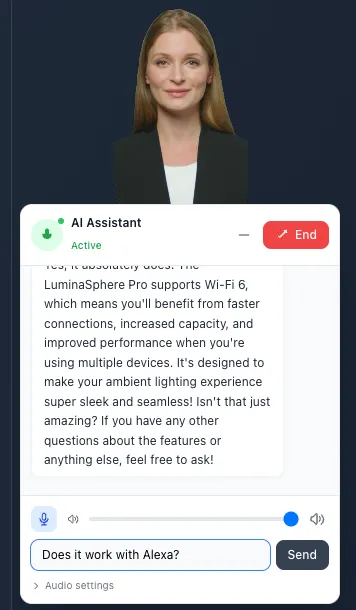
사용자는 말을 하는 대신 메시지를 입력할 수도 있습니다.
// components/ChatInterface.tsx
const sendMessage = async () => {
  if (!input.trim() || !convoApiRef.current) return;
  const message: IChatMessageText = {
    messageType: EChatMessageType.TEXT,
    text: input,
    priority: EChatMessagePriority.INTERRUPTED, // Interrupt current speech
    responseInterruptable: true,
  };
  // Send to agent (UID "1000")
  await convoApiRef.current.sendText("1000", message);
  setInput("");
};
EChatMessagePriority.INTERRUPTED 설정은 에이전트가 답변 도중일 경우 말을 멈추고 새로운 메시지를 즉시 처리하도록 지시합니다.
6단계: 종료 시 정리
사용자가 채팅을 닫으면 모든 연결을 정리합니다:
// components/ChatInterface.tsx
const handleEndCall = async () => {
  // Tell Agora to stop the agent
  if (agentId) {
    await fetch("/api/agora/leave-agent", {
      method: "POST",
      headers: { "Content-Type": "application/json" },
      body: JSON.stringify({ agentId }),
    });
  }
  // Leave RTC channel
  agora?.leave();
  // Unsubscribe RTM and destroy toolkit
  if (convoApiRef.current) {
    await convoApiRef.current.unsubscribe();
    convoApiRef.current.destroy();
  }
  // Logout RTM
  rtmClientRef.current?.logout();
};
leave-agent API 경로는 아고라의 엔드포인트를 호출합니다:
// app/api/agora/leave-agent/route.ts
const response = await axios.post(
  `https://api.agora.io/api/conversational-ai-agent/v2/projects/${APP_ID}/agents/${agentId}/leave`,
  {},
  { headers: { Authorization: `Basic ${auth}` } },
);
환경 변수
.env.local 파일을 생성합니다:
# Agora (Required)
AGORA_APP_ID=your_app_id
AGORA_APP_CERTIFICATE=your_certificate
AGORA_API_KEY=your_customer_key
AGORA_API_SECRET=your_customer_secret
# LLM - OpenAI (Required)
LLM_URL=https://api.openai.com/v1/chat/completions
LLM_API_KEY=sk-...
LLM_MODEL=gpt-4o-mini
# TTS - Azure (Required)
TTS_API_KEY=your_azure_speech_key
TTS_REGION=eastus
# Avatar - HeyGen (Optional)
HEYGEN_API_TOKEN=your_heygen_token
HEYGEN_AVATAR_ID=your_avatar_id
선택 사항: AI 아바타 추가
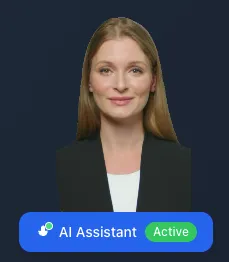
이 시스템은 HeyGen 아바타를 지원합니다. 아바타 인증 정보를 설정하여 기능을 활성화하세요:
// In start-agent payload
avatar: {
  vendor: "heygen",
  enable: true,
  params: {
    api_key: HEYGEN_API_TOKEN,
    avatar_id: HEYGEN_AVATAR_ID,
    agora_uid: "2000",      // Avatar gets its own UID
    agora_token: avatarToken,
    quality: "low"          // "low", "medium", "high"
  }
}
디버깅 팁
에이전트가 응답하지 않나요?
- Check that
ENABLE_AUDIO_PTS_METADATAis set before creating the RTC client - Verify the LLM API key and model are correct
- Look for errors in the browser console and Next.js server logs
성적표가 표시되지 않나요?
- Confirm
enable_rtm: trueanddata_channel: "rtm"in the agent config - Check RTM login succeeded (no token errors)
- Verify
subscribeMessage()was called with the correct channel
소리가 나지 않나요?
- 브라우저의 자동 재생 정책으로 인해 오디오가 차단될 수 있습니다. 이 경우 사용자가 직접 조작(예: 채팅 버튼 클릭)해야 합니다.
- 원격 오디오 트랙의 play() 메서드가 호출되었는지 확인하십시오
다음은 무엇일까요
이 데모는 핵심 통합 기능을 보여줍니다. 여기서 다음을 수행할 수 있습니다:
- 실제 제품 데이터 연결 — lib/product.ts를 데이터베이스 쿼리로 대체
- 상품 추천 추가 — AI가 관련 상품을 추천하도록 설정하세요
- 다국어 지원 — 사용자 선호도에 따라 ASR/TTS 언어를 전환할 수 있습니다
- 분석 — 고객이 가장 많이 묻는 질문을 파악하세요
아고 대화형 AI 플랫폼은 실시간 오디오, 음성 인식, 대규모 언어 모델(LLM) 연동 등 복잡한 부분을 처리합니다. 여러분의 역할은 제품과 고객을 중심으로 사용자 경험을 설계하는 것입니다.
간편 참조: 주요 파일
api/agora/initialize/route.ts:Creates channel + tokens
api/agora/start-agent/route.ts:Spawns ConvoAI agent with product context
hooks/useAgora.ts:RTC connection (audio in/out)
lib/conversational-ai-api/index.ts:Transcript handling via RTM
components/ChatInterface.tsx:Main UI with voice + text chat
간편 참조: API 엔드포인트
POST conversational-ai-agent/v2/projects/{appId}/join:Start agent
POST conversational-ai-agent/v2/projects/{appId}/agents/{agentId}/leave:
Stop agent
실시간 데모
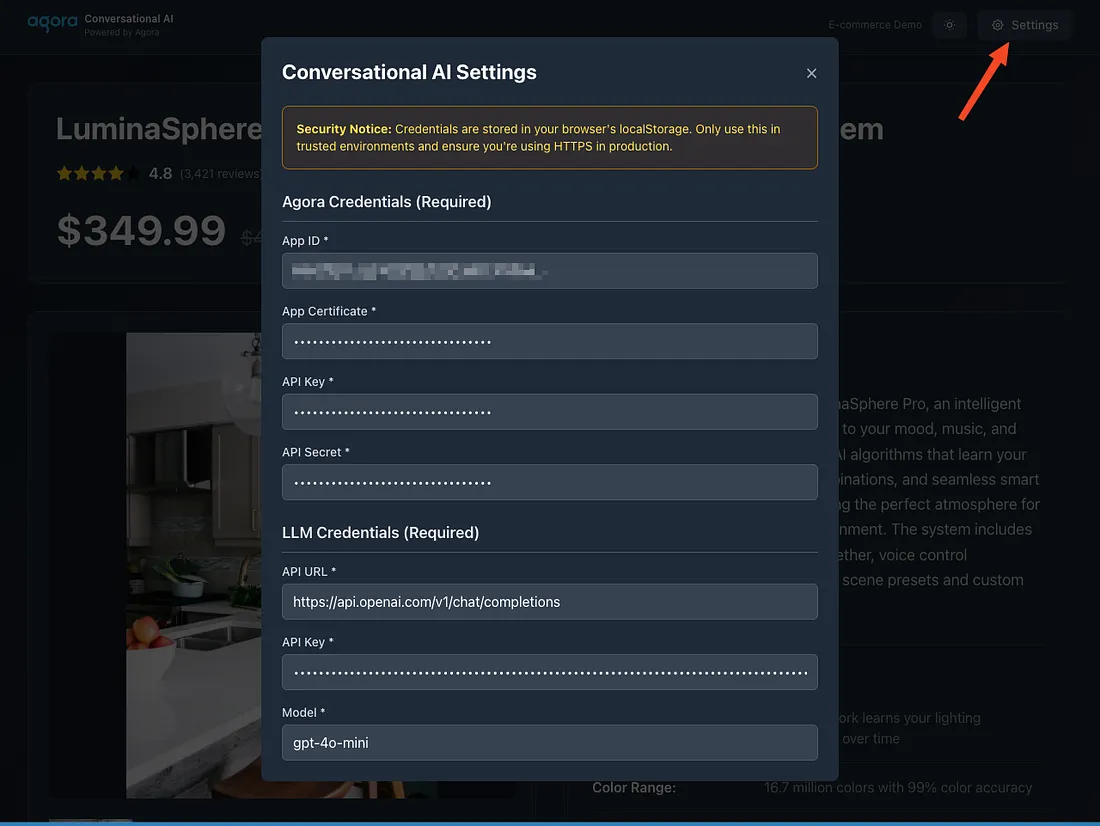
라이브 데모를 테스트하려면 오른쪽 상단의 ‘설정’을 클릭하고 ‘대화형 AI 설정’ 패널에 임시 테스트 자격 증명을 입력하세요(클라이언트 측 데모 환경에서는 절대 실제 운영용 자격 증명을 사용하지 마십시오). 저장 후 페이지를 새로 고치고 대화를 시작하여 아바타가 RTC 채널에 연결되고 실시간으로 응답하는지 확인하세요. 이 설정은 테스트 및 데모 용도로만 제공되므로, 실행 시 신뢰할 수 있는 환경과 HTTPS를 사용하십시오.
자료
- Full code on Github
- Agora Conversational AI Docs
- Agora RTC SDK Reference
- Agora Signaling SDK Reference
- Agora Community Discord
Built with Agora Conversational AI


